Other Projects
My Projects Pages
It's about sharing. That was sort-of my primary motivation for TightBytes - which sees pretty much no visitors ... whatever - and is what drives these pages. As you can tell from the next section, a bit of the reason was so I had a centralised location for reminders and links to stuff and so forth. Getting old makes one a bit forgetful, and I'll sometimes find myself out and about - away from my PC - trying to do something I absolutely Know how to do... yeah, but can't remember exactly how. Perhaps the reason I forget is because I use so many "tools".
What do I mean by "tools"?
These pages - the one's on Github, currently (2022) - were created (typed) in a program (free) called "Brackets". Note: I've since moved on to Phoenix Code. So, not in MS Word or on Notepad. The reason for that these apps are plain-text editors for programmers, which include some nice bells and whistles for programmers. The formatting codes aren't visible to the person reading the resultant page... thus:
produces: here is how I do bold and italic
The mechanisms used to use to write pages with were designed for Sphinx, which uses a markup language called reStructuredText as the default. Like in any language, programming 'languages' have certain rules so that you can pretty much get the same results all the time in a given environment. On the web, the most common 'language' is HTML:
A markup language allows you to insert formatting 'tags' right into the text itself. For example, in HTML the markup bit would be words enclosed by lesser-than and greater-than symbols. When you create the document the interpreter sees that as instructions on how the rest of the text should look or behave. Being comfortable in that "language" is just a matter of doing it enough, just like any other language.
HTML is just one such markup language. reStructuredText is another. The current pages are formatted using markdown (MkDocs). I also write in VBA and Python... after a while, I've ended up needing a reference on how to do certain things in a language I hadn't used in a while.
HTML and CSS
Grid for two simple layouts
Slide Show
Github Setup
On my Mac, in the main user folder - sort-of like the "Home/Username" folder in Linux - there is an AllHelp folder containing subfolders for each product, as well as a folder in AllHelp/GitPages, where all build files end up. If a new product's users would benefit from some sort of help system for that product, the product get a folder in that AllHelp folder. Any product with users will have a repository for that product on GitHub.
Using as an example a document called "KeysToLife", the following approach more-or-less seems to get the job done. You will need two instances of Terminal running: one for Sphinx to build html from .rst files, the other, to talk to github.
I now use Github Desktop which makes the process infinitely simpler, particularly when I stuff things up: it suggests solutions, which the commandline approach doesn't do.
Other Help Tips
Changing Settings in Chrome
These tips pertain to Chrome for Mac: doesn't matter much which version of the Mac operating system, as far as I can tell. Open the Chrome browser:

Mine is already open which is why I've got a white dot to the left of it. A key link on your Chrome browser is the one to your settings page. This is in the upper right-hand corner of the browser:

When you click on this, you get the following menu, from which you select 'Settings':

However, to turn off 'dark mode' in Chrome, you actually go to a new search page:

At the bottom right-hand corner is another settings link:

If you click on the 'Dark theme: On' menu item, it will turn Dark Theme: Off.

Thanks, Emily [ChatGPT]
In Visual Studio Code, you can use the following steps to select all the text between two instances of text:
- Open the file you want to work with in Visual Studio Code.
- Press Ctrl + F or Cmd + F to open the Find widget.
- Enter the starting instance of the text you want to select in the Find input box. For example, if you want to select all the text between "start" and "end," enter "start" in the Find input box.
- Press Enter to find the first instance of the text.
- Once the first instance is found, press Ctrl + F2 or Cmd + F2 to select all instances of the text in the file.
- Use the Ctrl + D or Cmd + D shortcut repeatedly to move the cursor to the next instance of the text.
- Keep pressing Ctrl + D or Cmd + D until you reach the second instance of the text you want to select. This will select all the text between the two instances.
- If you accidentally went beyond the second instance, press Ctrl + U or Cmd + U to deselect the last selection and continue with step 7.
- Once you have selected all the text you want, you can perform operations like copying, cutting, or formatting on the selected text.
By following these steps, you can easily select all the text between two instances in Visual Studio Code.
How to Do Google Meet
Accepting an Invitation to a Meet
In the email on my "Invited" email account - which is typically, usually going to be you since I'll mostly set up these for now until you get the hang of it - you simply click on "Yes:

or here:

That's in your email invitation. Doing so will add it to your Calendar, which will look like this:

When you click on that event, it will bring up that event, and in the event you'll simply click on the "Join with Google Meet" link, which will bring up Google Meet, activating video and you're good to go.
Setting up A Meet
The following instruction are for when YOU want to set up a Meet, as opposed to joining a Meet someone else set up (i.e., accepting an invitation). To make it easier, I tend to use 'Calendar' that comes with GMail.... that way, I don't have to hunt through emails to find an invitation: it's right there in my GMail calendar. The Gmail Calendar has a little 31 in it:

By the way (BTW), if you don't see that Calendar icon in your right-sidebar, go down to the bottom of the page and click on:

Then, it will appear up near the top of the right sidebar, along with other useful GMail apps. When you click on the icon, it'll bring up that day's events. As you can see, the get-together we had worked out a few days back is displayed in my calendar.

Double-clicking on this event brings up all the details, including a link to the "Meet" page, generally visible in the middle of that event.
For example, here's how I set up our next meeting, for next Tuesday arvo, your time; Wednesday morning, my time. I click on the date under the word "Calendar" near the top of that dialogue (top arrow) and then, select the date from the pop-up calendar.

I have date set up to GMT + 10hrs (which is Brisbane time) in my GMail settings. I already know that Wednesday morning at seven am is going to be Tuesday afternoon at 2pm your time. So, I add a title - not strictly necessary, but it is helpful - and set the time, and Click on "Add Google Meet video Conference":

I also add a description: this is a great way to share objectives and other thoughts.

Remember, the "Join With Google Meet" brings up the "Meet" page, enabling you to join.
When you click on "Add Guests": your most-contacted email recipients should appear in a list:

Now, you should see yourself as organiser and the guest list underneath your name. It's going to be truly awesome when we get some of the others onboard with this!

When you click "Save" at the bottom of that event:

you'll be prompted to send invitations to to everyone on the guest list - saves you from having to manually send out invitations.

Copying Files from Stick to a Mac
To accomplish this, you will use 'Finder', which is the Mac's answer to the Window's 'File Explorer'. May I suggest setting up 'Finder' in the following fashion... makes everything a bit easier.
With 'Finder' selected, go to the menu section at the top of the Mac screen, and on the left-hand side next to the Apple logo, chose 'Finder' and select:
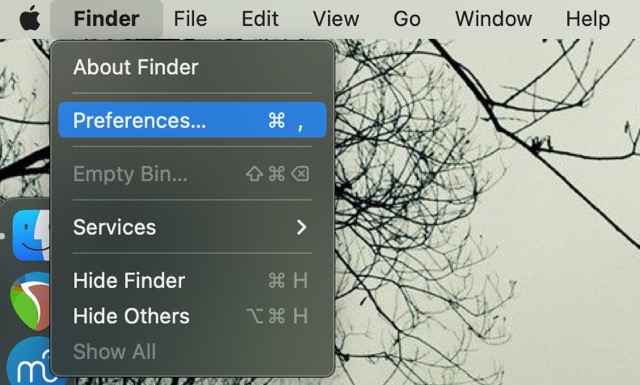
Make the following changes to these settings:
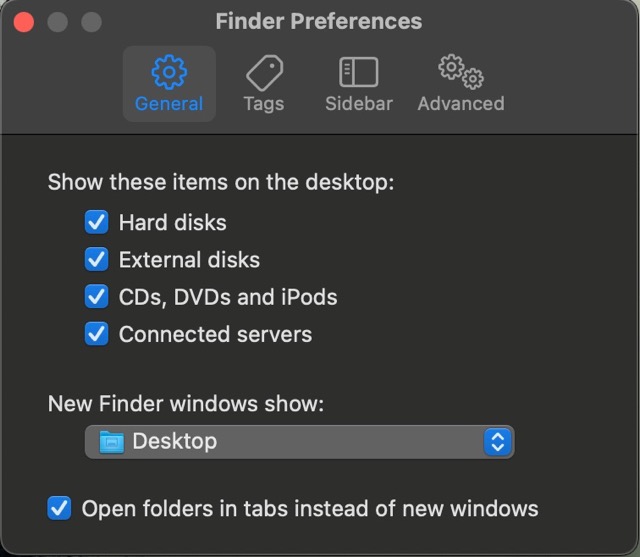
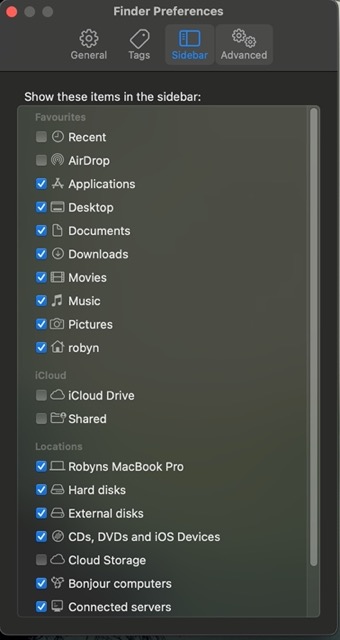

You will notice your memory stick appear in the left sidebar of 'Finder', under 'Locations' as soon as you plug it in to the USB slot. When you click on that name, the files in that folder will show up in the file browser (the main window):
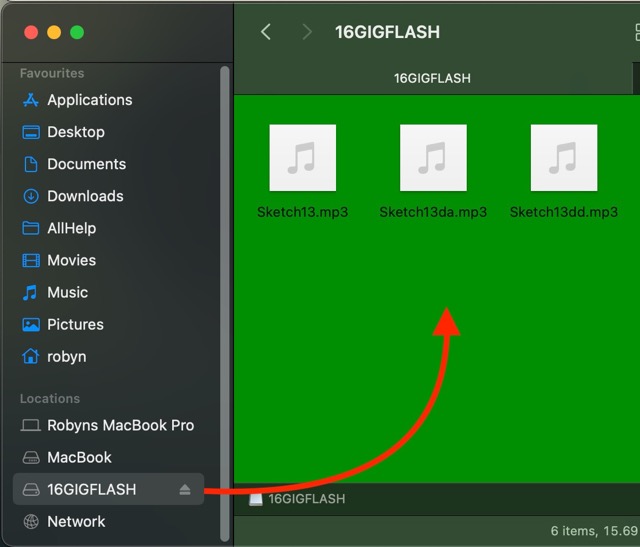
Holding down the [CMD] key - command - and pressing [A] will highlight all the files in that folder:
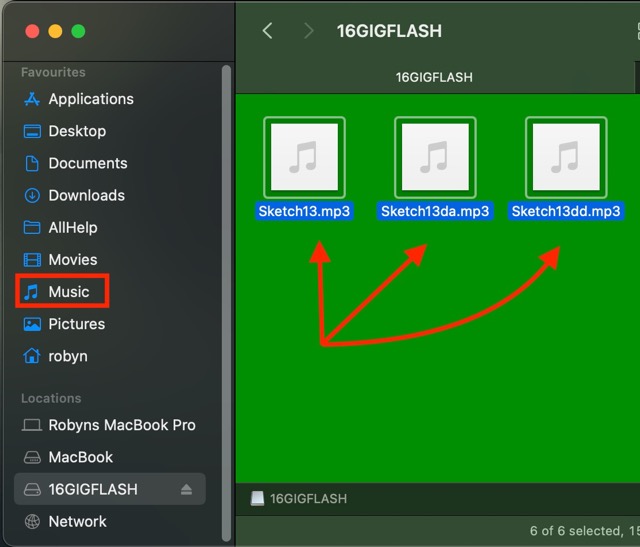
Note: make sure that you have actually clicked somewhere on the folder itself to select it before pressing [CMD] [A]. The names of the files will change colour: mine go blue. Press [CMD] [C] to copy the files.
I'm going to suggest placing music files in the 'Music' folder, to make it easy to find the files. Identify the 'Music folder - I've outlined it in red in the previous image and right-click on it and select:
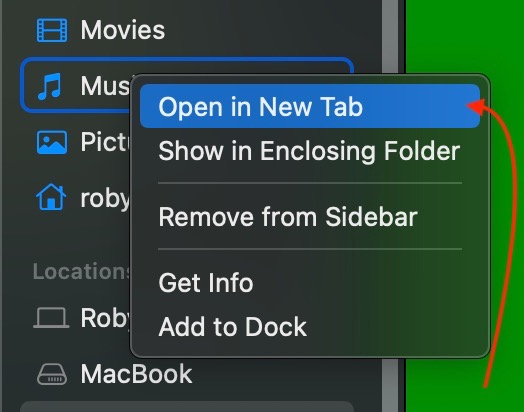
The 'Music' will open in a new tab and be the active folder. Press [CMD] [V] to paste your music files into that folder, or optionally right-click and select:
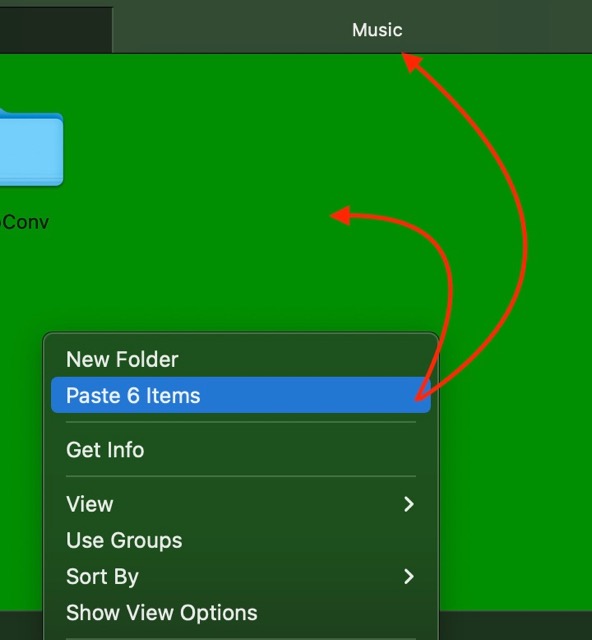
Should be good to go.
To put your music on your iPhone, you can use the Apple Cloud or Google's Drive. I don't have an iPhone so I don't know the process, but it should be fairly straight-forward.
Video Projects
Update: 2022-Dec-18
Still trying to get this right:
Update: 2022-Aug-24
(Note: formerly "Film Projects") I can unequivocably state: right now in June 2022, I suck at video. Reason: composition. Which is why I was taking the Tomorrow's Filmmakers course ... but sort-of lost interest. Initially, I assessed it at being worth every penny. However, I really am a bit conflicted about the main presenter, who infuses his instruction with, for lack of a better term, 'religiosity'. I mean, the message sounds like he's promoting Christianity - I'm a Christian, and you would think I'd see him as a kindred spirit - but somehow the message seems... off.
Like, it is supposed to be about film-making techniques. If I follow a guide on composition, it would feel equally awkward and forced to keep getting the instructor's religious viewpoints and exhortations.
Oh well, it was US$100. You get what you pay for.
Speaking of courses, since I use Musescore for composing music, it totally made sense to sign up for the full "Musescore bank of courses"... there's heaps of really useful information on these pages, particularly as they were having an 85% off sale. Turns out: it totally is worth every penny! Remember, Musescore is a free download. You want to write music? this is the way to go.
Music for Film
I'd like to start making the sort of music that fits with film: a sound that helps make more clear what the film is trying to say. So I've started scoring a new piece... it's in B minor, starts in the woodwinds with bass strings providing a sort of heartbeat (pizzicato).
So far, I have this:

It's wintertime in Southeast Queensland. Nights are quite cool - actually feels cold to us. The noise of cars and other machines finally diminish in the evening, for which I'm rather grateful. That's what I'm trying to say with the first few bars of this piece.
Key Links
Excellent Youtube channel on budget filmmaking:
When he hit 100K subscribers, he put out this excellent video:
...on the whole creating content idea that actually can be applied to whatever endeavour one might engage in, whether filmmaking or gardening or bonsai or cardmaking... whatever.
Excellent Summary
Done with the Bullshit?
Posted by Elizabeth Lytle
Ian Henderson
LL.B. in Law, Dalhousie University, Faculty of Law May 10
[Q]
Why does Trump constantly resort to name-calling and trying to bring others down below him?
[A]
The best description of Donald Trump was done by Nate White a British columnist:
“A few things spring to mind. Trump lacks certain qualities which the British traditionally esteem. For instance, he has no class, no charm, no coolness, no credibility, no compassion, no wit, no warmth, no wisdom, no subtlety, no sensitivity, no self-awareness, no humility, no honour and no grace – all qualities, funnily enough, with which his predecessor Mr. Obama was generously blessed.
So for us, the stark contrast does rather throw Trump’s limitations into embarrassingly sharp relief.
Plus, we like a laugh. And while Trump may be laughable, he has never once said anything wry, witty or even faintly amusing – not once, ever. I don’t say that rhetorically, I mean it quite literally: not once, not ever. And that fact is particularly disturbing to the British sensibility – for us, to lack humour is almost inhuman. But with Trump, it’s a fact. He doesn’t even seem to understand what a joke is – his idea of a joke is a crass comment, an illiterate insult, a casual act of cruelty.
Trump is a troll. And like all trolls, he is never funny and he never laughs; he only crows or jeers. And scarily, he doesn’t just talk in crude, witless insults – he actually thinks in them. His mind is a simple bot-like algorithm of petty prejudices and knee-jerk nastiness. There is never any under-layer of irony, complexity, nuance or depth. It’s all surface.
Some Americans might see this as refreshingly upfront.
Well, we don’t. We see it as having no inner world, no soul.
And in Britain we traditionally side with David, not Goliath. All our heroes are plucky underdogs: Robin Hood, Dick Whittington, Oliver Twist. Trump is neither plucky, nor an underdog. He is the exact opposite of that. He’s not even a spoiled rich-boy, or a greedy fat-cat. He’s more a fat white slug. A Jabba the Hutt of privilege. And worse, he is that most unforgivable of all things to the British: a bully. That is, except when he is among bullies; then he suddenly transforms into a snivelling sidekick instead.
There are unspoken rules to this stuff – the Queensberry rules of basic decency – and he breaks them all. He punches downwards – which a gentleman should, would, could never do – and every blow he aims is below the belt. He particularly likes to kick the vulnerable or voiceless – and he kicks them when they are down.
So the fact that a significant minority – perhaps a third – of Americans look at what he does, listen to what he says, and then think ‘Yeah, he seems like my kind of guy’ is a matter of some confusion and no little distress to British people, given that:
Americans are supposed to be nicer than us, and mostly are. You don’t need a particularly keen eye for detail to spot a few flaws in the man. This last point is what especially confuses and dismays British people, and many other people too; his faults seem pretty bloody hard to miss. After all, it’s impossible to read a single tweet, or hear him speak a sentence or two, without staring deep into the abyss. He turns being artless into an art form; he is a Picasso of pettiness; a Shakespeare of shit. His faults are fractal: even his flaws have flaws, and so on ad infinitum.
God knows there have always been stupid people in the world, and plenty of nasty people too. But rarely has stupidity been so nasty, or nastiness so stupid. He makes Nixon look trustworthy and George W. look smart. In fact, if Frankenstein decided to make a monster assembled entirely from human flaws – he would make a Trump. And a remorseful Doctor Frankenstein would clutch out big clumpfuls of hair and scream in anguish:
‘My God… what… have… I… created?’
If being a twat was a TV show, Trump would be the boxed set.”
Thank you Nate White.
BTW: Scientists don’t think (assume) anything, they make no assumptions. Science is evidence-driven. There is a fallacy in this assertion.
VSCode Search Tip
In Visual Studio Code, you can use regular expressions (regex) to select all text between specific markers like "startstart" and "endend". Here's how you can do it:
- Open the file in Visual Studio Code.
- Press Ctrl + F (or Cmd + F on macOS) to open the search box.
- Click on the icon with the three dots (⋯) to expand the search options.
- Enable the regex mode by clicking on the .* icon or by pressing Alt + R.
- In the search box, enter the following regex pattern: startstart([\s\S]*?)endend.
- startstart and endend are the markers you want to use to select the text in between.
- [\s\S]*? matches any character (including line breaks) between the start and end markers, non-greedily.
- Press Enter to start the search.
Visual Studio Code will highlight the matched text. To select all the occurrences, click on the "Select All" button or press Ctrl + Shift + L (or Cmd + Shift + L on macOS). You can now modify, delete, or copy the selected text as needed.
Note: Make sure your document doesn't contain nested instances of the start and end markers. If you have nested markers, the regex pattern may not work as intended.
Remember to exercise caution when modifying or deleting text using regex, as it can have unintended consequences. Always make sure to have a backup of your file before performing such operations.
OpenAI Key Suggestions for B Minor
In addition to D major, there are several other keys that complement the B minor key. Here are some common choices:
G major: G major is the relative major of B minor. These keys share the same key signature and have a close relationship, making them complementary to each other.
A major: A major is another complementary key to B minor. It shares two common tones with B minor (A and D) and provides a brighter and uplifting tonal contrast.
E minor: E minor is the parallel minor of G major and is harmonically related to B minor. It shares two common tones with B minor (E and B) and can create a melancholic or introspective musical atmosphere when used in conjunction with B minor.
F# major: F# major is the major key that is a semitone above B minor. It provides a sharp tonal contrast and can be used to create tension or a sense of brightness when juxtaposed with B minor.
These are just a few examples of keys that complement the B minor key. Ultimately, the choice of complementary keys will depend on the musical context and the desired emotional effect.